Stories move people because they give facts a human shape. A statistic can inform, but a story lets the reader feel the stakes, see the path, and imagine themselves inside the outcome.
In blog writing , storytelling converts information into momentum. It raises completion rates because the reader wants to know what happens next, increases saves because the structure is memorable, and improves shares because people pass along narratives that make them look insightful and helpful. When you design a blog as a story with characters, conflict, and change, you transform a post from a container of tips into a journey with a payoff.
Key Points:
Stories make blogs more engaging: People connect with stories more than facts alone. Stories keep readers interested, make the message stick, and encourage them to share the post.
Use a simple story structure: Setup, Struggle, Solution, Shift: Start with the situation, show the problem, explain the fix, and end with the results. This structure works for all types of blog posts.
Make it real and relatable: Use characters and problems your readers recognize. Include real obstacles, small details, and even mistakes to build trust.
Give readers something useful: After telling each part of the story, explain the lesson and offer a quick tool or tip they can use right away.
What Counts as a Story in a Blog
A story does not require a hero’s quest or a thousand words of scene-setting. In a blog, a story is any sequence where a recognizable character faces a problem, makes choices, and experiences a change. The character can be a client, a customer archetype, your team, or even the reader in second person. The problem must be specific and felt, not generic. The choices should reveal strategy, tradeoffs, and constraints. The change must be visible and measured, whether in revenue, time saved, ranking lift, or peace of mind. When these pieces are present, your advice lands with credibility because the reader watched it work.
The Narrative Spine Every Blog Can Use
Setup, Struggle, Solution, Shift
A dependable spine for non-fiction posts has four beats. The setup names who are involved, where they started, and what they wanted. The struggle shows the obstacles that made the goal hard, including missteps that many readers will recognize. The solution introduces the approach you advocate, step by step, and in the order in which it truly happened. The shift captures the results and the lessons learned, plus the next decision this outcome enables. This arc is flexible enough for case studies, how-to guides, opinion pieces, and even tool comparisons.
Time Boxing for Pace
Readers feel lost when time is vague. Ground your story in weeks, sprints, or seasons. A blog that moves from week one experiments to week six results gives the brain handholds and keeps scrolling briskly. Time boxing ensures your advice reads as a real process rather than a pile of tips.
Characters That Readers Recognize
The Relatable Protagonist
The protagonist should mirror your audience’s situation and limitations. If your readers work inside budget caps, your character should too. If they balance multiple stakeholders, show those voices. Use concrete labels like “mid-market ecommerce brand launching a subcategory” or “two-person content team inside a regulated industry” so the reader sees themselves quickly.
The Credible Guide
You are not the hero; you are the guide. Position your voice as the mentor who provides tools and perspective, then steps aside while the protagonist makes the call. This keeps the focus on the reader’s agency and avoids the self-congratulatory tone that kills trust. The guide explains tradeoffs, names risks, and admits where luck helped.
Conflict That Creates Curiosity
Name the Real Constraint
Every good story turns on a constraint. In blogs, the constraint might be a PPC ceiling, a technical limitation, a seasonality cliff, a skeptical executive, or an audience habit that resists change. Name it explicitly. When the reader recognizes the constraint from their own world, they lean forward to learn how you handled it.
Show False Starts Without Shame
Authenticity lives in the misstep. If you tried a tactic that did not work, include it and explain why it failed. The lesson prevents your reader from repeating the mistake and strengthens your authority because you are reporting the whole journey, not only the highlight reel.
Dialogue, Detail, and the Right Amount of Scene
Use Selective Scene Setting
Two or three sensory details can anchor a scene without slowing the pace. The hiss of a Slack notification, the glance at a budget spreadsheet at 10:43 p.m., the quiet click of a scheduler app finally confirming a meeting—small specifics create realism. Avoid long atmospheric passages; you are writing a blog, not a novel. Give just enough texture to make the stakes feel lived-in.
Let People Speak Briefly
Short snippets of dialogue humanize complex decisions. A product manager saying, “If we miss this release, we lose the window,” communicates urgency better than a paragraph of exposition. Keep quotes tight, attribute them cleanly, and make sure every line advances the plot or clarifies a choice.
Data as Plot, Not Decoration
Place Numbers at Turning Points
Data matters when it changes decisions. Put metrics where the story turns. The baseline number sets context, the mid-experiment number justifies a pivot, and the final number proves the payoff. Surround each metric with meaning, such as how it compares to industry norms or past attempts, and what threshold you aimed to cross.
Visual Descriptions When You Can’t Embed Charts
If your post will be copied into plain-text channels or read on small screens, describe charts in words that paint the picture. A line like “click-through rose from two percent to four and held for three weeks despite doubling impressions” conveys shape, not just endpoints, and helps the reader remember the pattern.
The “Explain, Then Equip” Method
Teach the Principle in Plain Language
After each narrative beat, pause to explain the principle at work. If the protagonist changed headings and internal links to match intent, explain why that matters in search systems that prioritize entity relationships. Keep the explanation short and direct, then return to the story so momentum continues.
Give the Reader a Tool
Equip the reader with a small asset at the end of each major section. Offer a one-paragraph checklist, a phrase template, a question set for stakeholder meetings, or a two-step diagnostic they can run today. When every section ends with something they can use, your post earns saves and shares because it transfers capability, not just information.
Voice and Rhythm That Carry the Reader
Write Like You Speak on Your Best Day
The right voice sounds like a confident colleague who respects the reader’s time. Favor active verbs, concrete nouns, and sentences that vary in length. Place complex ideas in simple syntax. Avoid jargon unless your audience uses it to think. When you must use a term of art, define it once in passing and move on.
Break Up the Wall Without Breaking the Flow
H2s and H3s act as stage lights that keep the reader oriented. Summarize each section in the subhead so scanning delivers value, then reward the deep reader with layers of detail. Use short paragraphs without sacrificing substance, and end sections with lines that feel like conclusions, not fade-outs.
Ethics That Strengthen Story Power
Protect Privacy and Credit Sources
If your story includes client data or internal screenshots, secure permission and anonymize responsibly. Link out to the research you cite and explain your role accurately. Readers share posts that play fair because they want their networks to trust what they recommend.
Avoid Manufactured Villains
Do not straw-man competitors or shame people who made reasonable decisions with limited information. Place the conflict in the problem, the process, or the constraint, not in caricatures. Respectful storytelling travels farther and ages better.
A Mini Framework You Can Apply Today
The One-Project, Three-Scenes Method
Choose a single project and break it into three scenes: the moment the problem became undeniable, the moment a counterintuitive decision was made, and the moment the result landed. In each scene, include one sensory detail, one line of dialogue, and one number. Then insert a brief explanation after each scene that pulls out the principle. Close with a short checklist so the reader can replicate the approach. This structure builds narrative, teaches clearly, and equips action in under fifteen hundred words.
Case Example in Blog Form
Setup
A regional retailer’s blog drew traffic but failed to convert newsletter signups. The team believed pop-ups were the answer, but they risked hurting time-on-page in a niche where long reads signaled authority.
Struggle
Initial tests added aggressive pop-ups tied to scroll depth. Time-on-page fell by twenty percent, and the bounce rate spiked. A product lead said, “If we lose dwell time, we lose trust.” The team needed a way to ask for emails without breaking the flow.
Solution
The writer reframed the opt-in as part of the story. Each post’s midpoint included a tightly aligned content upgrade, presented as the natural next step of the narrative rather than an interruption. The copy changed from “Subscribe for updates” to “Get the five-question worksheet we used to choose our vendor, with our answers filled in.” The form sat in-line, visually subdued, and repeated only once near the end for readers who skipped the first instance.
Shift
Newsletter signups increased by 143 percent while time-on-page recovered to within three percent of baseline and eventually surpassed it. The difference was not the box; it was the story’s logic. The opt-in felt like a tool from inside the plot, not an ad pasted on top of it. The team standardized the approach and retired pop-ups on long-form posts entirely.
Turning Reader Emotion into Action
Identify the Moment of Recognition
Every strong blog has a point where the reader thinks, “That’s me.” Place a quick call-to-action right after that line. Invite the reader to apply the specific step you just demonstrated and promise a small, immediate win. When the emotional recognition and the action are neighbors, conversion rates climb.
Close With a Change, Not a Recap
End by naming the transformation your method creates and the next decision it unlocks. A good close feels like a door opening. It should suggest momentum beyond the page and give the reader a reason to return with results or questions, deepening the relationship your story began.
Common Storytelling Mistakes in Blogs
Starting Too Far Back
Do not begin in childhood when the conflict starts at the kickoff meeting. Choose the moment when the stakes first become real and move forward. Backstory belongs in short, strategic flashes.
Hiding the Metric
If numbers feel scary, the story will sag. Include the baseline even when it is low and the outcome even when it is modest. Readers trust trajectories more than miracles.
Confusing Anecdote with Evidence
One success story is not proof for all cases. Present the narrative as a concrete example, then broaden to principles that explain when the method applies and when it does not. This humility strengthens authority.
A Practical Writing Workflow
Outline the Arc Before You Draft
Write four sentences for setup, struggle, solution, and shift. Under each, jot the one number, one quote, and one concrete detail you will use. Only then draft. This keeps the post focused and prevents digressions.
Draft the Scenes, Then Add the Explanations
Get the story down first while the energy is high. Return to weave in the “explain, then equip” sections as H3s. Finish by tightening the intro and sharpening the close so the piece opens strong and lands with purpose.
Final Thoughts
Storytelling gives blog writing its spine. It clarifies who the reader should care about, why the problem matters, how decisions unfolded, and what changed as a result. Done well, it respects time, raises trust, and makes your advice portable because it travels inside a narrative the reader can retell. When you treat each post as a story with characters, conflict, and change—and when you pair that story with clear explanations and simple tools—you turn content into capability and readers into advocates.
FAQs
Isn’t storytelling just fluff in business blogs
No. Story structure organizes information for memory and action. When characters, constraints, and outcomes are specific, storytelling increases credibility rather than diluting it.
How long should a story-driven blog be
Long enough to complete the arc without padding. In many niches, twelve to fifteen hundred words with clear H2 and H3 scaffolding balance depth with completion on mobile.
What if I don’t have permission to share client details
Anonymize responsibly, secure approvals where possible, and focus on process over proprietary data. Composite characters are acceptable when disclosed, provided the constraints and lessons remain truthful.
Can I use storytelling in technical how-tos?
Yes. Frame the how-to with a brief setup about the environment and constraints, then walk through the solution as the sequence of choices you made. Anchor each step with a metric or observable result.
Hostinger Black Friday Deal is on! What do you want? A burger or start a blog?
Yeah! Starting a blog has become easier and cheaper than ever before.
You can start a blog only at $1.79/month with Hostinger’s Black Friday deals in 2025. Yes! You are right Hostinger is providing the best deal on Black Friday.
They have made their amazing pricing more awesome by offering up to 90% off on Black Friday Deals 2025.
Let’s have a look at the Hostinger Black Friday Sale offer at a glance:
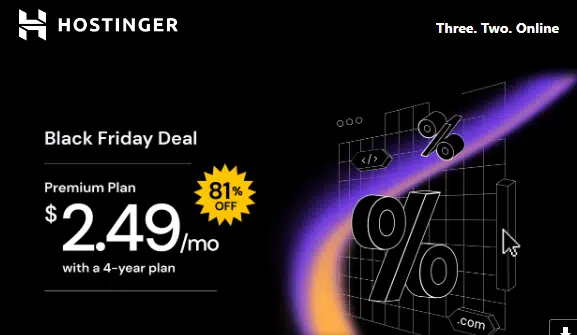
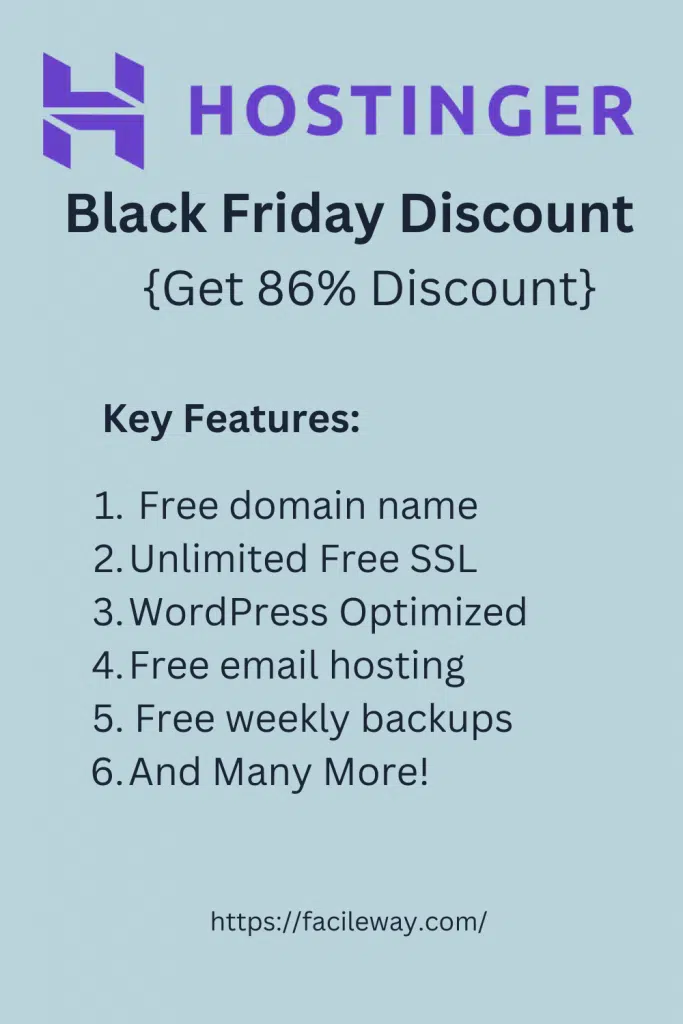
📢Announcement: Hostinger is offering an 81% discount this year! Don’t forget to use the coupon code “BLACKFRIDAY” to get an additional 10% Discount!
Let’s Get Introduced To Hostinger
Hostinger is a name that is considered the fastest and cheapest Web hosting provider and domain registration.
In 2007, they started a free web hosting service with no advertisement named 000webhost.com.
Then in 2011, they started this web hosting brand and claimed they had 29 M+ active users.
Hostinger offers fast and reliable web hosting for newbie bloggers and WordPress developers.
You can get up to 85% off by visiting Hostinger’s Black Friday and Cyber Monday deals to get a variety of web hosting solutions at an affordable price.
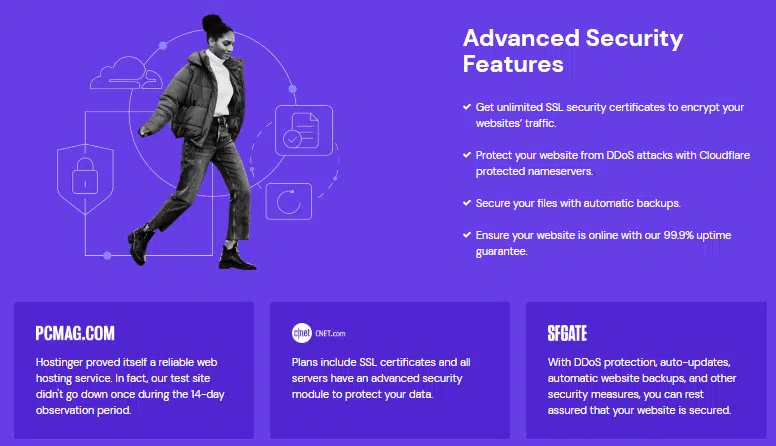
All plans include free SSL certificates, email accounts, WordPress-optimised servers, and 99.9% uptime guarantees.
The highest-tier plans also include a free domain name, a free CDN, daily backups, Google Adwords credit, and free website migration.
Hostinger Black Friday Deals 2025
After investigating for some time and checking hundreds of reviews, we are recommending hosting so that your real money doesn’t go in vain with waste.
How to Get Hostinger Black Friday Deals? 81% Off, Plans Start At Just $1.85/Month
Hostinger is offering a great deal on Black Friday. Here, I will try to simply elaborate on the point step by step. Let’s get started-
Hostinger Black Friday 2025
Firstly, go to this special link to get access to the Hostinger Black Friday Deals 2025.
Secondly, after getting access, click on the “Get Started Now” button, where you will be redirected to three different pricing policies. You can grab any one of them.
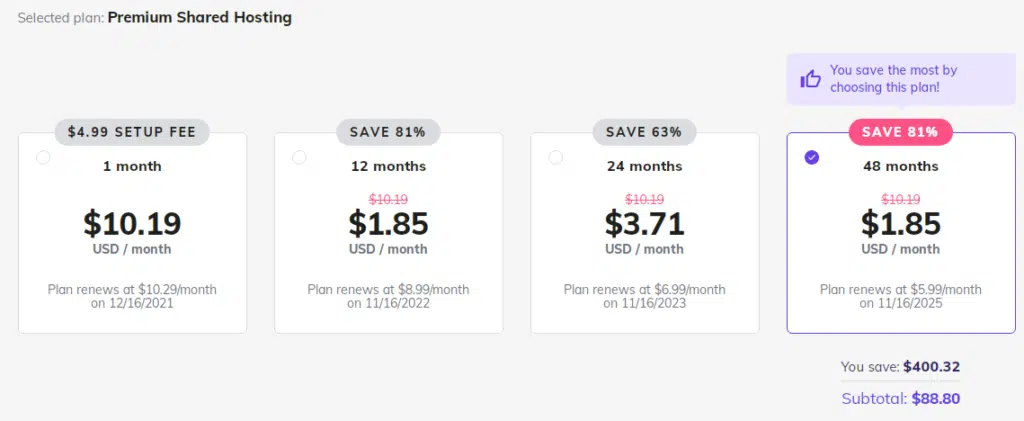
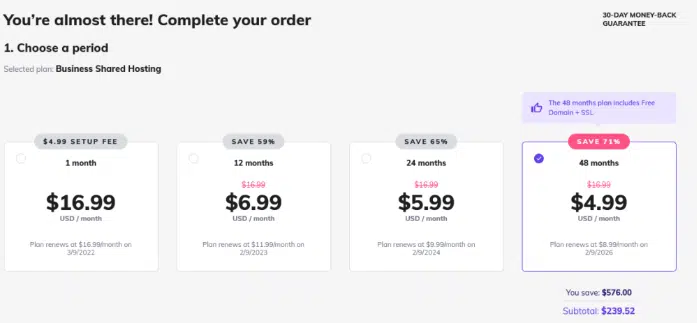
The basic plans start at $1.85 per month(after giving you a big 81% off) when you sign up for 4 years, which costs you an overall $88.80!
This is how they calculate-
Premium shared hosting plan
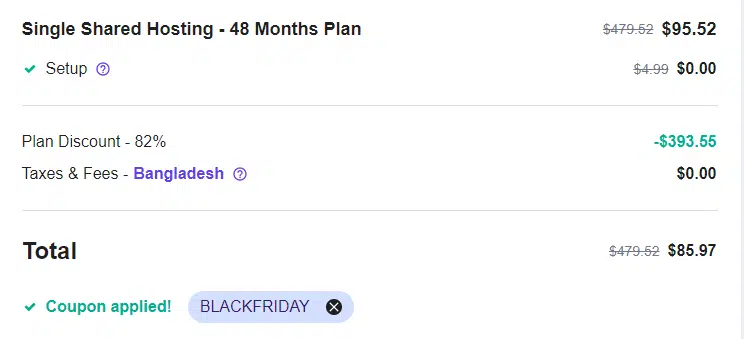
Finally,complete the payment. Normally, Hostinger offers an 80% discount on Black Friday. But I have a special coupon code for you that will allow you to enjoy an 81% Discount.
Hostinger Black Friday
Simply insert the coupon code “Black Friday” to grab this huge opportunity!
Congratulations! You have done it right! Now enjoy their superfast hosting services.
Note: The deal starts on October 20, 2025, and ends on November 10, 2025.
Hostinger Pricing Plans
You can choose from a variety of hosting packages at Hostinger. They all offer unique features suited to specific needs.
With Hostinger, there is no free plan, but the Single Shared Hosting plan is so affordable that it almost feels like it is. You can start here.
Hostinger Single
Hostinger’s most basic plan falls under the category of shared web hosting, which means that your website shares a server with other websites.
It is ideal for people without a large budget for expensive web hosting because the cost of the server is shared by numerous others.
The downside of this is that site speed may be compromised because so many other people use the same server.
If you are just starting with a website, the Single plan is perfect for you.
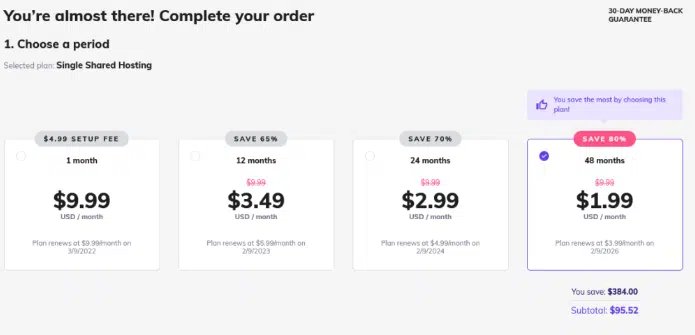
Single plan pricing starts at $1.99/month with a 48-month commitment, and that price jumps to $9.99/month if you sign up every month.
Hostinger Black Friday offers
It includes 1 website, 30 GB of SSD storage, 100 GB bandwidth, 10 GB of solid-state storage, a free SSL certificate, and 1 email account.
Hostinger Premium
In Hostinger’s Premium plan, you get everything the Single plan has plus some bonus features like free domain name registration (for the first year only), unlimited bandwidth, 100 GB of SSD storage, and 100 email accounts.
If you are looking for a reliable web hosting service without breaking the bank, this is the perfect plan for you.
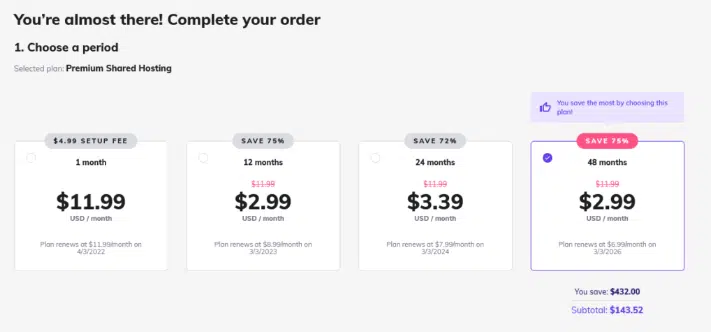
In the Hostinger Black Friday Deals, you can grab this amazing premium shared hosting at a more affordable price.
Hostinger Black Friday sale
A 48-month commitment starts at $2.99/month, and a monthly commitment starts at $11.99/month.
This plan includes everything in the Premium plan, plus daily backups, 4 times the processing power, and 200 GB SSD storage.
There is a $4.99/month option for 48 months and a $16.99/month option for a recurring commitment.
This web hosting plan is perfect for websites that need some extra boost without worrying about their hosting issues.
Hostinger Black Friday sale
Cloud Hosting
If you’re contemplating cloud hosting over traditional shared hosting, check out Hostinger’s offerings.
Do you know what cloud hosting is?
You’re in good hands with us.
Cloud hosting differs from normal hosting in that, instead of your site being hosted on a single server, it is hosted in the cloud, which allows for more flexibility and scalability.
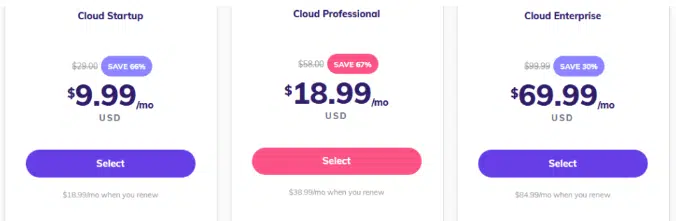
If you need more than this, you might want to consider the Global plan, which will cost you $69.99/month for 48 months.
There is a massive price increase between the Professional and Global Plans due to a few features, such as 4 times the speed boost, 16 GB RAM, and 8 CPU cores.
VPS Hosting
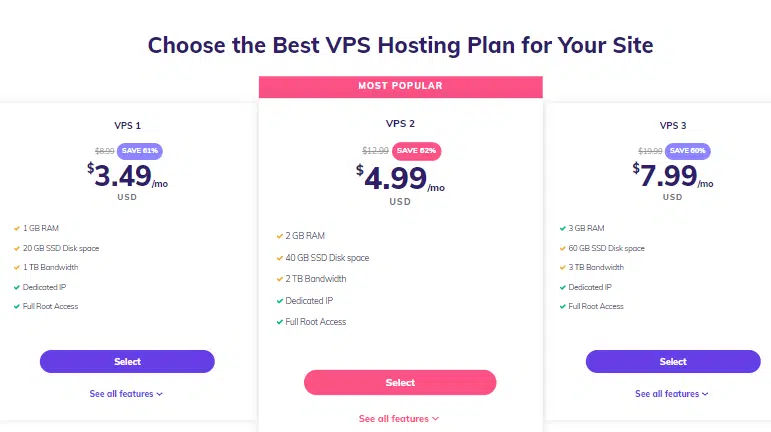
If you want your business’s website to make waves, then VPS hosting may be right for you. A VPS is a virtual private server, which means you own the server, rather than sharing it with others.
There are six different VPS hosting plans offered by Hostinger, starting at $3.95/month for 48 months. Those prices get you 3 GB RAM, 60 GB storage, and 3 TB bandwidth.
The plans go up to the VPS 6 plan, which includes 8 GB RAM, 160 GB storage, and 8 TB bandwidth.
It will cost you $38.99/month for 48 months, and you can save huge money on Hostinger Cyber Monday Deals and Black Friday Hosting Deals.
Minecraft Hosting
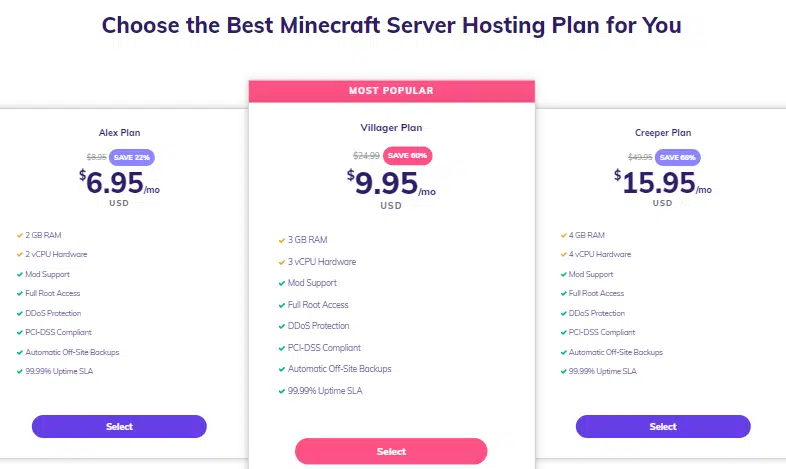
The Minecraft hosting service provided by Hostinger is unique among its competitors: it is designed for gamers. 48-month plans start at $8.95/month and go up to $29.95/month.
This service allows you to install your game mods, among other things.
There is no shortage of options when it comes to hosting with Hostinger. The company also offers WordPress hosting, which is one of the most popular choices for website builders.
Hostinger has hosting plans for everyone, so read on to find out which is right for you.
Let’s have a quick explanation of the above features so that you can understand the terms better.
1. Good Uptime And Fast Load Time
When you are planning to purchase hosting for your blog or business website, the most important thing to consider is uptime.
In this situation, other hosting-providing companies can’t beat Hostinger because of their great uptime at such cheap prices.
After checking a lot of reviews, we have come to know that their average uptime is 99.98%.
This is a pretty good uptime for such cheap Web hosting. Some reviews showed they are ensuring 100% uptime also.
If a website takes more than three seconds to load, 40% of people skip surfing the page. So, Fast load time is playing a vital role here.
They boast servers in the USA, Asia, and Europe (UK) that ensure a 1000 Kbps connection for the fastest site-loading experience.
2. Unlimited website hosting
You can host unlimited sites on their hosting, except for the basic plan. You will get all the premium features and daily backups, a free SSL certificate, and 2x WordPress-optimized speed with their plans.
Besides, a free domain name is also available with Premium and Business web hosting plans, which will save you a bit of money in the long run.
3. Easy and Simple To Use Website Builder
The most amazing part is that you can easily get access to their simple-to-use website builder that will help you to customise your site as you desire.
There are tons of templates. Once you have selected a template, you can design your site according to your needs.
4. Easy Interface
If you need to add users to your account, you can just do it all within the dashboard. It’s simple.
Let’s walk through the process. To add a user account, go to the top right corner and click on the + icon. This will bring up an interface where you can enter the username and email address of the account you need to add.
After that, you’ll need to add that user to a group. You can do this by clicking the group’s tab in the navigation bar on the left-hand side.
Clicking the checkbox next to the group name will check that box to add it to the selected user. That’s all there is to it. Now you have a new user on your account.
5. 30-day money-back guarantee
You have bought their hosting service but you are not satisfied. Don’t worry! They have a good option for you.
Hostinger offers a 30-day money-back guarantee for its customers if they’re not satisfied with its services.
Note: Not every product is refundable. They have some special terms for that
6. 24/7*365 customer support
The main restriction of doing a hosting business is the lack of proper customer support. Customer support can make or break a hosting provider.
If you are going through downtime or any other hosting-related problem, and the host can not provide you with a solution as soon as possible, the host will lose tons of sales.
Hostinger will not disappoint you. You can easily get stuck with them with their live chat option.
7. Standard Pricing Policy
They are offering the best pricing for their customers. You can have this awesome $0.80 per month deal for Single Shared hosting, but all you need to do is you have to commit to Hostinger for 48 months.
As a modern entrepreneur, there are many important aspects you need to consider when establishing your own business.
One of which is the hosting of your website. If you do not get the best hosting available to you, you could be putting your business in jeopardy.
It’s also vital to your chances of success that you select dependable and affordable hosting.
8. Global Data Centre
If you’re going to be hosting a game server, you need to make sure that it’s going to be fast and reliable. Otherwise, you won’t be able to keep up with traffic, and you’ll lose your paying customers.
With Hostinger, you will get a choice to choose your data centre between 7 different regions worldwide. That means you can choose the best place that will be best for your players to make your game more engaging.
9. 1-Click WordPress Installation
Don’t waste your time with complicated WordPress setups anymore. With Hostinger, all you need to do is sign up for an account, open the control panel, and click one button to install WordPress. It’s that easy.
FAQs About Hostinger Black Friday Discount
Here are some FAQs related to Hostinger-
1. How to get a Hostinger Black Friday sale discount?
You don’t need to do any extra tasks to avail of the Hostinger black Friday deals 2025. All you need to do is go to a special link and complete the purchase.
2. How much discount is Hostinger offering?
Hostinger is offering up to a 90% discount on its hosting plans. But the discount varies depending on pricing policies.
90% discount on the Basic Plan
82% discount for Premium Plan
78% discount for Business Shared Hosting Plan
The basics will cost you &0.99/month when you commit them for four years. And the overall cost for four years will be $47.52 only!
3. Does Hostinger offer a money-back guarantee?
Yes, Hostinger offers a 30-day money-back guarantee. If you are not happy with their hosting services, you can claim your money back, except for some of these services.
4. Does Hostinger offer unlimited site hosting?
You can host an unlimited number of websites on Hostinger except for their basic plan.
Hostinger Black Friday Discount
Wrapping Up
Hostinger is one of the best hosting providers for beginners, thanks to its good performance, user-friendly backend, and affordable pricing.
My go-to recommendation for users just starting their online journey or on a tight budget is this service.
Now, Hostinger offers one of the best price-performance web hosting packages on Black Friday.
Thank you for being with me until the end.
I hope this post helped you a lot to buy your desired Webhosting services at a cheap price on this Hostinger Black Friday sale 2025.
If so, please share with your friends via social media, and if you want to share your opinion, you are welcome. Please feel free to share via comment.